Sales Commission Errors: Where to look and how to check

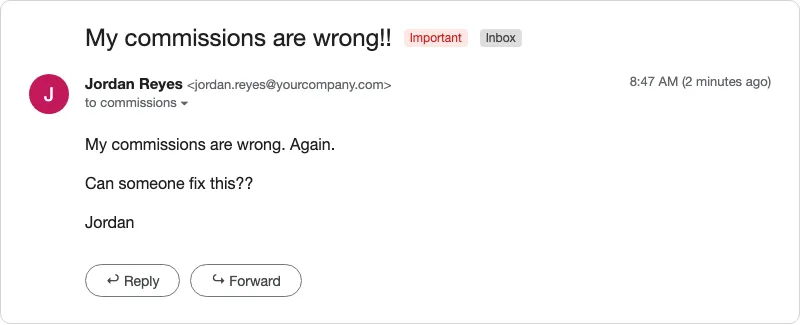
Your commission looks wrong, and you want to know if it’s a real sales commission error. Maybe it’s lower than the number in your head, or lower than the dashboard you checked this morning.
I’ve run sales commissions for 6 years and checked more than 5,000 payouts. Reps ask me about their numbers a lot. Often the calculation isn’t the problem. We’re looking at different numbers, or reading different rules.
Sales commission audit checklist
Go through this before you raise a question:
- Any change or exception to your commission plan that your manager agreed to has reached the person calculating your commission.
- You’re using the current plan, not last year’s.
- You’re looking at the report your commissions are calculated from.
- You’re looking at the right commission period.
- Every deal you’re counting qualifies under the plan.
- You aren’t counting anything twice.
- You know which tier you reached and what rate it pays.
- You’ve looked for deals moved into or out of this period.
If your company tracks commissions in a spreadsheet, I can audit your commission spreadsheet for free and show you where errors are likely to come from.
Where sales commission errors come from
1. Your manager agreed to something nobody passed on
A manager and a rep agree to something, nobody tells the person calculating commissions, and the standard plan gets paid. In my experience, this is the main reason the calculation itself ends up wrong.
Check: Confirm the agreement reached the person calculating your commission.
2. You’re checking the wrong dashboard
CRM views and team dashboards aren’t always built to calculate commissions. For example, they can:
- Count the same customer or deal twice.
- Include deals that don’t qualify under your plan.
- Keep changing after commissions are calculated, as deals are canceled.
Check: Use the report your commissions are calculated from.
3. The deal doesn’t count under your plan
Plans often pay only on certain deals. If the company doesn’t earn on a type of deal, it may not pay commission on it.
Check: Read the fine print on which deals qualify.
4. You’re reading the wrong tier or rate
Thresholds are easy to miss, especially when the plan changes from one year to the next. You may be remembering last year’s numbers.
Check: Find your tier and rate in the current plan.
5. A deal was canceled after you were paid (a clawback)
Cancellations usually show up after the commission has been paid. They come out of the next commission run, so a short check can come from an earlier deal.
Check: Look for earlier deals taken back in this period.
A canceled deal is typically taken back at the rate it was paid at.
6. A deal was moved between periods
A deal that closes just after a period ends can sometimes push you over a tier for the period before. With a manager’s approval, it can count in the earlier period. It then has to come off the later period, or it gets paid twice.
Check: Look for deals moved into or out of this period.
How to check your commission
This is the order I use for a commission reconciliation when someone asks about their number. You can follow most of it from your side.
- Start with the source of truth used to calculate commissions.
- Compare it to your own records.
- Redo the math.
- Point out the exact error if you notice one. Don’t just say “my commissions are wrong.”
How to dispute a commission that still looks wrong
If you think your commission is incorrect, don’t just say “My sales commission is wrong.” Instead:
- Ask for the source of truth. Get the report your commission is calculated from and the list of deals behind it.
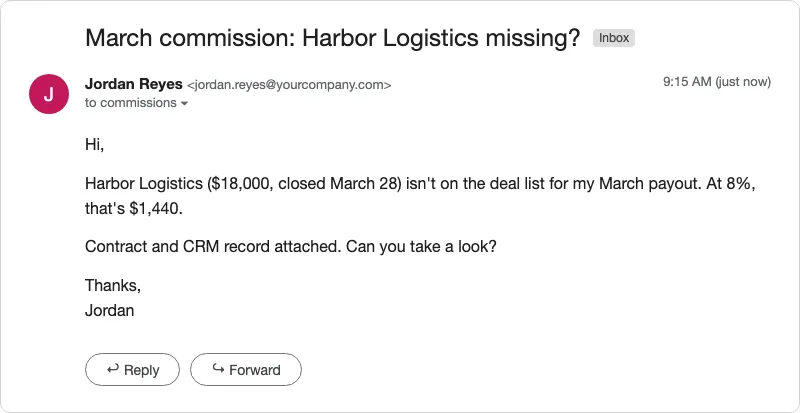
- Point to exactly where it’s wrong. Name the deal, the rate or the line that doesn’t match.
- Say what you think caused it. If you know where the problem is coming from, point it out.
- Bring your evidence. Include the record of the deal or the line in your plan.
- Get promises confirmed. If your manager promised you something, ask them to confirm it with the person who calculates your commission.
A question that’s easy to investigate sounds like this: “This deal is missing from your list, and here’s the record of it.”
What a good commission process looks like
You should be able to trace every dollar on your statement back to a deal and a rate. Here’s how I set it up for every rep I pay:
- A clear statement. Results sit next to the dollars they turn into, and cancellations get their own line.
- Visible formulas. Reps can see how every number is calculated, but they have view-only access, so nobody can change it.
- A saved copy of the data. I can show what the number was on the day I calculated it.
- The list of deals. Every rep can see what’s behind their payout.
- A check before I calculate. I confirm I’ve pulled the right period and the right deals, and that they went in correctly.
- A check after I calculate. I know what my reps usually earn, so a high earner with a low payout makes me look again.
Know where your commission numbers come from
Read your commission plan, and know exactly where your numbers come from. Don’t check your pay against a dashboard that wasn’t made for commissions.
If nobody at your company can show you the deal and the math behind your check, send them this article. I run sales commissions every month for companies, with every payout checked and ready for payroll. They can also get a free commission spreadsheet audit.